
ADF: How to pass parameters between taskflows?


Simple stuff actually for most ADF users but this post is for the absolute beginners.

Here is the sample Taskflow design and we need to pass parameters from Caller TF to Callee TF.
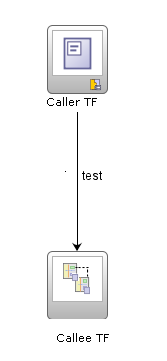

Go to the definition of Callee TF and goto Parameters tab and define the Input Parameter Definitions.

Now go to the taskflow design and click on the Callee TF and go to the properties tab. In the 'Parameters' section you will see the parameters that you defined earlier. Here you should fill in the values that you want to pass.
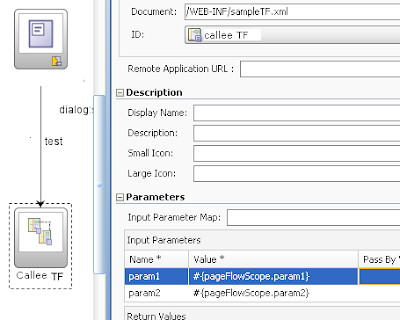


On the event of which the Callee TF is called, you should set the values in the pageFlowScope.param1 and param2.

<af:commandToolbarButton id="ctbCreate" action="dialog:showWizard" >
<af:setPropertyListener from="0"
to="#{pageFlowScope.dpDimensionId}"
type="action" />
<af:setPropertyListener from="0"
to="#{pageFlowScope.decisionPackageId}"
type="action" />
</af:commandToolbarButton >

Now you would be able to get the values of param1 and param2 as 0 in the callee TF. Simple.

Comments

Popular posts from this blog

How I converted a table in an email to a graph on a website? Hint: Azure Functions and Logic App

This mini-project started as a necessity.  I get an email like this everyday, which gives daily numbers for different metrics. The problem with such an email is that it is difficult to keep track of or gauge the rate of growth of these metrics. If you want to know how what the previous day's numbers were you need to go to the previous day's email.  The better option any day is to have a graph that shows the values of the metrics every day. Something like this: With this goal I set out to make this system but with as less coding and expenses as possible.  First obvious step in the process was to get hold of the email and extract its text. The easiest way to do this is to use Azure Logic App.  Here is what my logic app looks like: When any new email arrives in my Outlook 365 account, with a subject that contains "System usage Stats as on", it passes the body of the email to an Azure function named 'EmailTextCleanerFunction' (code below), whose job is to clean an...

Changing Eclipse Workspace Directory

Recently I moved my entire Eclipse installation directory but the workspace was still getting created in the older location only. And worst there was no option to select the Workspace directory in the Window->Options->Workspace menu. To change the workspace location in Eclipse do this. Goto ECLIPSE_HOME\configuration\.settings directory, edit the org.eclipse.ui.ide.prefs file and change the RECENT_WORKSPACES value to the desired location. If you want that Eclipse prompts you to select workspace when you start it, change the SHOW_WORKSPACE_SELECTION_DIALOG value to true. And you are done!

Hands on review: Yahoo! Mail app for Windows 8

Before you start mocking me for using Yahoo! Mail, let me explain that this is NOT my primary mail account and I use Gmail and Outlook.com for my daily use. Yes, this Yahoo! account was once my daily haunt but that was during college days and those days are long gone. I don't use Yahoo! Mail much but still there are some group subscriptions and I just log in once in a while to see what's happening in those forgotten groups. And due to this reason, I have always kept track of changes in Yahoo! Mail and the fact is that you can blame them for everything but not really lack of trying. Though most of those tries just ended up cluttering the UI and adding somewhat needless features. However, now we hear that new CEO Marissa Mayer is focusing once again on the mail and first major product to come out is Yahoo! Mail app for Windows 8. So how is it? The Login screen is pretty neat and purple background with an envelope watermark is very pleasing, very Yahoo!. However why ...