If you have gone through part 1 of this series, you have used Cloudera's Hadoop Quickstart VM to setup a working instance of Hadoop and have running instance of various Hadoop services. Now it is a good time to go back to a little theory and see how different pieces fit with each other.
HortonWorks, another Hadoop distributor, has got an excellent tutorial for Hadoop and each of its accompanying services, which you see in below image (taken from the above URL). You can go to this page and read about Hadoop in detail.

However I am going to summarize and simplify some of the content and definitions which make it easy for a beginner to quickly understand and proceed.
OK, so this is the definition of Hadoop on HortonWorks site: Apache Hadoop® is an open source framework for distributed storage and processing of large sets of data on commodity hardware.
You will agree that biggest challenges in any computing are very basic: storage and processing. Processing could be any operation that you do on the data. It could be merely counting the words in text files or finding more complex patterns in them. And since you can't do all the processing with your data kept in RAM all the time, you need to store it on HDD.
Hadoop uses 'commodity hardware' for both these purposes. The usual machines used as 'commodity hardware' have generally better configuration than your average laptop which has 8 GB RAM, 5-7 core processors and 500 GB HDD. But the non-commodity hardware which Hadoop clusters tend to compete with, are something like this: Oracle Exadata and Exalogic machines having TBs of RAM and hundreds of processors. These are extremely well engineered machines with software and hardware carefully designed to complement each other, and they cost a bomb!
Such machines are an example of what is called 'vertical scaling': increasing RAM, processing power and storage. Hadoop clusters which simply add more and more machines are examples of 'horizontal scaling' and since there is virtually no limit of how many machines you can add to a cluster, there is no limit to the processing power and storage capacity you can achieve!
(Theoretically even Exadata machines can be clustered to create a super powerful cluster but it will be so costly that it won't be economically viable. Just imagine having a cluster where each machine costs a million dollars!)
Let's go back to the architecture diagram shown above.
As is very clear Data Management and Data Access modules form the core of Hadoop and are responsible for storage and processing of the data. HDFS (Hadoop Distributed File System) and YARN (Yet Another Resource Negotiator) form the crux of it. HortonWorks site actually explains these technologies quite comprehensively so read it.
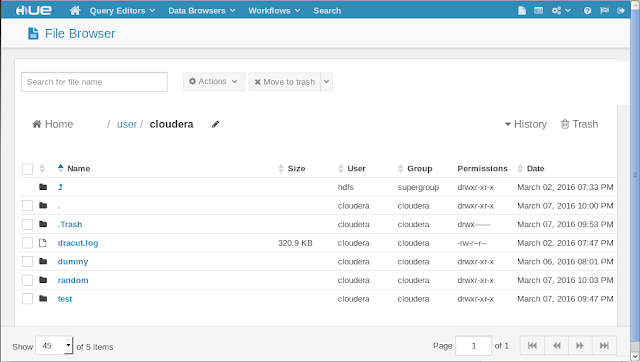
OK if you are reading this now you probably know how does HDFS work. Let's just see how it looks like. Go to Hue web UI. Click on 'File Browser'. What you see is the directory structure of the HDFS, which looks and behaves much like your local file system. You can create and delete directories and files, change directories and alter permissions for them, just like files on your local files.
You can do all of this on terminal using shell commands as well.
hadoop fs -mkdir newDirectory //create a new directory on HDFS
hadoop fs -put /home/someFile /user/cloudera/newDirectory //copy a file from your local file system to HDFS directory
hadoop fs -get /user/cloudera/newDirectory /home/someFile //download a file from HDFS directory to local file system.
There are lot many commands which you can check here.
HortonWorks, another Hadoop distributor, has got an excellent tutorial for Hadoop and each of its accompanying services, which you see in below image (taken from the above URL). You can go to this page and read about Hadoop in detail.
However I am going to summarize and simplify some of the content and definitions which make it easy for a beginner to quickly understand and proceed.
OK, so this is the definition of Hadoop on HortonWorks site: Apache Hadoop® is an open source framework for distributed storage and processing of large sets of data on commodity hardware.
You will agree that biggest challenges in any computing are very basic: storage and processing. Processing could be any operation that you do on the data. It could be merely counting the words in text files or finding more complex patterns in them. And since you can't do all the processing with your data kept in RAM all the time, you need to store it on HDD.
Hadoop uses 'commodity hardware' for both these purposes. The usual machines used as 'commodity hardware' have generally better configuration than your average laptop which has 8 GB RAM, 5-7 core processors and 500 GB HDD. But the non-commodity hardware which Hadoop clusters tend to compete with, are something like this: Oracle Exadata and Exalogic machines having TBs of RAM and hundreds of processors. These are extremely well engineered machines with software and hardware carefully designed to complement each other, and they cost a bomb!
Such machines are an example of what is called 'vertical scaling': increasing RAM, processing power and storage. Hadoop clusters which simply add more and more machines are examples of 'horizontal scaling' and since there is virtually no limit of how many machines you can add to a cluster, there is no limit to the processing power and storage capacity you can achieve!
(Theoretically even Exadata machines can be clustered to create a super powerful cluster but it will be so costly that it won't be economically viable. Just imagine having a cluster where each machine costs a million dollars!)
Let's go back to the architecture diagram shown above.
As is very clear Data Management and Data Access modules form the core of Hadoop and are responsible for storage and processing of the data. HDFS (Hadoop Distributed File System) and YARN (Yet Another Resource Negotiator) form the crux of it. HortonWorks site actually explains these technologies quite comprehensively so read it.
OK if you are reading this now you probably know how does HDFS work. Let's just see how it looks like. Go to Hue web UI. Click on 'File Browser'. What you see is the directory structure of the HDFS, which looks and behaves much like your local file system. You can create and delete directories and files, change directories and alter permissions for them, just like files on your local files.

You can do all of this on terminal using shell commands as well.
hadoop fs -mkdir newDirectory //create a new directory on HDFS
hadoop fs -put /home/someFile /user/cloudera/newDirectory //copy a file from your local file system to HDFS directory
hadoop fs -get /user/cloudera/newDirectory /home/someFile //download a file from HDFS directory to local file system.
There are lot many commands which you can check here.
Comments